> For the complete documentation index, see [llms.txt](https://pwa.spomky-labs.com/llms.txt). Markdown versions of documentation pages are available by appending `.md` to page URLs; this page is available as [Markdown](https://pwa.spomky-labs.com/1.4.x/the-manifest/icons.md).
# Icons
To integrate the icon details into the Progressive Web App (PWA) manifest file, ensure that each icon listed is accompanied by its respective size. For example, `icon-256x256.png` is indicated as having a size of 256px by 256px. This is crucial for providing clear visual elements across different devices and resolutions.
The `sizes` attribute indicates the size of the icon to the browser. For PNG or JPEG icons, specify the dimensions (e.g., 48, 96, 256). For vector icons, you can use "any" as they are scalable without losing quality. The `format` attribute is also important as it tells the browser what the file format is, helping it to render the image correctly or the browser to select the most suitable format.
{% code title="/config/packages/pwa.yaml" lineNumbers="true" %}
```yaml
pwa:
manifest:
enabled: true
icons:
- src: "icons/icon.png"
sizes: [192]
- src: "icons/maskable-icon.png"
sizes: [192]
purpose: "maskable"
- src: "icons/icon.svg"
sizes: 0
```
{% endcode %}
### `src` Parameter
The `src` parameter is the path to the resource file. It can be:
* an [Asset Mapper resource](https://pwa.spomky-labs.com/),
* an absolute path to the resource,
* a [Symfony UX Icon](https://ux.symfony.com/icons) if the `symfony/ux-icons` bundle is installed.
{% code title="/config/packages/pwa.yaml" lineNumbers="true" %}
```yaml
pwa:
manifest:
icons:
- src: "icons/icon-48x48.png"
sizes: [48]
- src: "/home/project/foo/bar/icon-48x48.png"
sizes: [48]
- src: "bx:badge-check"
sizes: [48]
```
{% endcode %}
### `sizes` Parameter
The sizes parameter indicates the suitable sizes for the icon. The expected value is a positive integer or a list of positive integers.
`0` means `any` size and is suitable only for vector images.
The recommended sizes for application icons are as 48, 72, 96, 144, 168, 192, 256 and 512 pixels.
{% code title="/config/packages/pwa.yaml" lineNumbers="true" %}
```yaml
pwa:
manifest:
icons:
- src: "icons/icon-192x192.png"
sizes: [48, 96, 192]
- src: "icons/icon.svg"
sizes: 0
```
{% endcode %}
### `format` Parameter
When the `format` parameter is set, the bundle will try to save the image in the specified format. If the component `symfony/mime` is present, the bundle will guess the correct type.
In general, browsers can read `svg`, `png` and `jpg` types. Modern browsers may support `webp`.
{% hint style="info" %}
Conversion to SVG is not possible.
{% endhint %}
### `purpose` Parameter
The `purpose` parameter defines how the icon should be used by the operating system. Common values include:
* `"any"` (default): The icon can be used in any context
* `"maskable"`: The icon has a safe zone and can be cropped by the platform
* `"monochrome"`: The icon is intended to be used as a monochrome icon with a solid fill
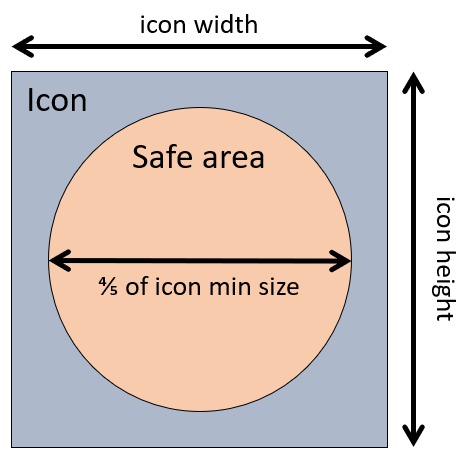
The `maskable` purpose indicates the icon has a security margin and borders can be cropped on certain devices.
Maskable image safe area
### `border_radius` Parameter
The `border_radius` parameter allows you to add rounded corners to your icon. This is particularly useful for creating modern-looking icons that match current design trends.
The value must be an integer between 1 and 50, representing the radius as a percentage of the icon size.
{% code title="config/packages/pwa.yaml" overflow="wrap" lineNumbers="true" %}
```yaml
pwa:
manifest:
icons:
- src: "icons/icon.png"
sizes: [192, 512]
border_radius: 20
```
{% endcode %}
**Common values:**
* `0`: No rounding (sharp corners)
* `10-20`: Slightly rounded corners
* `30-40`: Well-rounded corners
* `50`: Fully circular icon
{% hint style="info" %}
The border radius is applied proportionally to all icon sizes generated from the same source.
{% endhint %}
### `image_scale` Parameter
The `image_scale` parameter controls how much padding or scaling is applied to your icon. This is useful when you need to adjust the visual weight of your icon or add breathing room around it.
The value must be an integer between 1 and 100, where:
* `100`: Icon fills the entire space (no padding)
* `80`: Icon is scaled to 80% with 10% padding on each side
* `50`: Icon is scaled to 50% with 25% padding on each side
{% code title="config/packages/pwa.yaml" overflow="wrap" lineNumbers="true" %}
```yaml
pwa:
manifest:
icons:
- src: "icons/icon.png"
sizes: [192, 512]
image_scale: 85
```
{% endcode %}
This is particularly useful when:
* Your icon design is too large and needs padding
* You want consistent spacing across different icon sizes
* You need to adapt an existing icon to maskable requirements
### `background_color` Parameter
When using `image_scale` or `border_radius`, you can specify a `background_color` to fill the space around or behind the icon:
{% code title="config/packages/pwa.yaml" overflow="wrap" lineNumbers="true" %}
```yaml
pwa:
manifest:
icons:
- src: "icons/icon.png"
sizes: [192, 512]
image_scale: 85
border_radius: 20
background_color: "#ffffff"
```
{% endcode %}
### SVG Attributes
You can customize any SVG attribute to control how your icon is rendered. The bundle allows you to modify fill colors, stroke properties, and other SVG root attributes:
{% code title="config/packages/pwa.yaml" overflow="wrap" lineNumbers="true" %}
```yaml
pwa:
manifest:
icons:
- src: "icons/icon.svg"
sizes: 0
svg_attr:
fill: '#2196f3'
stroke: '#ffffff'
stroke-width: '2'
```
{% endcode %}
**Common attributes:**
* `fill`: Main fill color
* `stroke`: Outline color
* `stroke-width`: Border width
* `opacity`: Transparency level
* `color`: Value for `currentColor` references
**Legacy `svg_color` option:**
For backward compatibility, `svg_color` (which sets the `color` attribute) is still supported:
```yaml
pwa:
manifest:
icons:
- src: "icons/icon.svg"
sizes: 0
svg_color: '#15fe68' # Equivalent to svg_attr.color
```
{% hint style="info" %}
Use `svg_attr` for full control over SVG rendering. The `svg_color` shorthand is maintained for backward compatibility.
{% endhint %}
---
# Agent Instructions
This documentation is published with GitBook. GitBook is the documentation platform designed so that both humans and AI agents can read, navigate, and reason over technical content effectively. Learn more at gitbook.com.
## Querying This Documentation
If you need additional information that is not directly available in this page, you can query the documentation by asking a question.
Perform an HTTP GET request on the following URL with the `ask` and `goal` query parameters:
```
GET https://pwa.spomky-labs.com/1.4.x/the-manifest/icons.md?ask=&goal=
```
`ask` is the immediate question: it should be specific, self-contained, and written in natural language.
`goal` is what the user is ultimately trying to achieve, the reason they need the answer. Sharing it helps GitBook give you a better, more relevant answer. A goal is most helpful when it describes the outcome the user wants rather than restating the question. For example, with `ask=how do I create an API token`, a goal like `automate deployments from our CI pipeline` lets GitBook tailor the answer to that use case.
The response will contain a direct answer to the question and relevant excerpts and sources from the documentation.
Use this mechanism when the answer is not explicitly present in the current page, you need clarification or additional context, or you want to retrieve related documentation sections.