> For the complete documentation index, see [llms.txt](https://pwa.spomky-labs.com/llms.txt). Markdown versions of documentation pages are available by appending `.md` to page URLs; this page is available as [Markdown](https://pwa.spomky-labs.com/the-manifest/screenshots.md).
# Screenshots
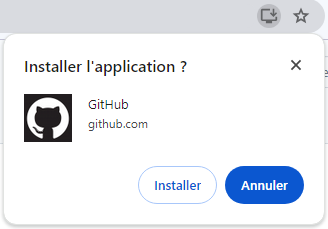
Progressive Web App screenshots enable richer installation UI. As shown below, by default only the application name and short name are visible.
GitHub installation UI
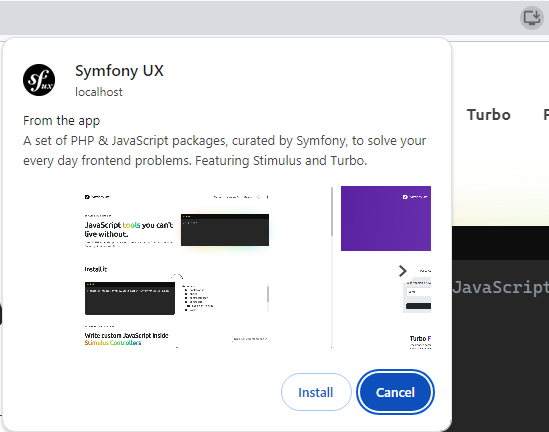
However, by including screenshots in the web app manifest, the installation experience can be significantly improved. These screenshots give users a visual preview of the app, enhancing their understanding and increasing the likelihood of installation.
Screenshots should showcase the most important functionalities of your application and be of high quality to attract users.
In the example below, a selection of screenshots are visible and the user can navigate to show them all. On mobile devices, the interface is different, but shows the same information.
## Generating Screenshots
The recommended way to manage screenshots is using the `#[Screenshot]` PHP attribute on your controller methods. This approach automatically generates screenshots and integrates them into your manifest.
{% content-ref url="/pages/NSVvfc715Nxk6RpCXtRQ" %}
[Screenshots](/image-management/screenshots.md)
{% endcontent-ref %}
## Manifest Parameters
When screenshots are added to the manifest (either automatically via attributes or manually), the following parameters are available:
### `src` Parameter
See the description [on the `icon` page](/the-manifest/icons.md#src-parameter).
Ensure that the screenshots you provide are of high quality. Crisp and clear images can make a significant difference in how users perceive your app.
### `type` Parameter
This parameter is similar to [the `format` parameter for the icons](/the-manifest/icons.md#type-parameter).
### `label` Parameter
The label parameter provides a way to give a brief description or caption for the screenshot. This helps users to understand what the feature or screen is about before they have installed the app.
### `platform` Parameter
The `platform` parameter specifies which operating system the screenshot is intended for.
Possible values include:
* Device platform identifiers:
* `"android"`
* `"chromeos"`
* `"ipados"`
* `"ios"`
* `"kaios"`
* `"macos"`
* `"windows"`
* `"xbox"`
* Distribution platform identifiers:
* `"chrome_web_store"`
* `"itunes"`
* `"microsoft-inbox"`
* `"microsoft-store"`
* `"play"`
### `form_factor` Parameter
The `form_factor` parameter defines the intended device form factor for your screenshots.
Possible values:
* `"narrow"`: For narrow screen devices, like phones.
* `"wide"`: For wider screen devices, such as tablets or desktops.
{% hint style="info" %}
When using the `#[Screenshot]` attribute, `form_factor` is automatically calculated based on the screenshot dimensions.
{% endhint %}
---
# Agent Instructions
This documentation is published with GitBook. GitBook is the documentation platform designed so that both humans and AI agents can read, navigate, and reason over technical content effectively. Learn more at gitbook.com.
## Querying This Documentation
If you need additional information that is not directly available in this page, you can query the documentation by asking a question.
Perform an HTTP GET request on the following URL with the `ask` and `goal` query parameters:
```
GET https://pwa.spomky-labs.com/the-manifest/screenshots.md?ask=&goal=
```
`ask` is the immediate question: it should be specific, self-contained, and written in natural language.
`goal` is what the user is ultimately trying to achieve, the reason they need the answer. Sharing it helps GitBook give you a better, more relevant answer. A goal is most helpful when it describes the outcome the user wants rather than restating the question. For example, with `ask=how do I create an API token`, a goal like `automate deployments from our CI pipeline` lets GitBook tailor the answer to that use case.
The response will contain a direct answer to the question and relevant excerpts and sources from the documentation.
Use this mechanism when the answer is not explicitly present in the current page, you need clarification or additional context, or you want to retrieve related documentation sections.